说明
教程面向有一定 linux 基础的用户。部分命令不会作出详细解释。执行前,请确认知晓自己在做什么
适用
Debian / Ubuntu
教程
请切换至 root 账户执行
cd /root
wget https://d.ne.world/new/linux/trojan-1.16.0-linux-amd64.tar.xz
tar xvf trojan-1.16.0-linux-amd64.tar.xz
rm -rf trojan-1.16.0-linux-amd64.tar.xz
cd /root/trojan
rm -rf config.json
cp examples/client.json-example config.json
查看配置
- 在 https://my.v2b.world/#/dashboard 复制订阅地址
- 浏览器访问该订阅地址
- ctrl + a 全选
- ctrl + c 复制网页内容
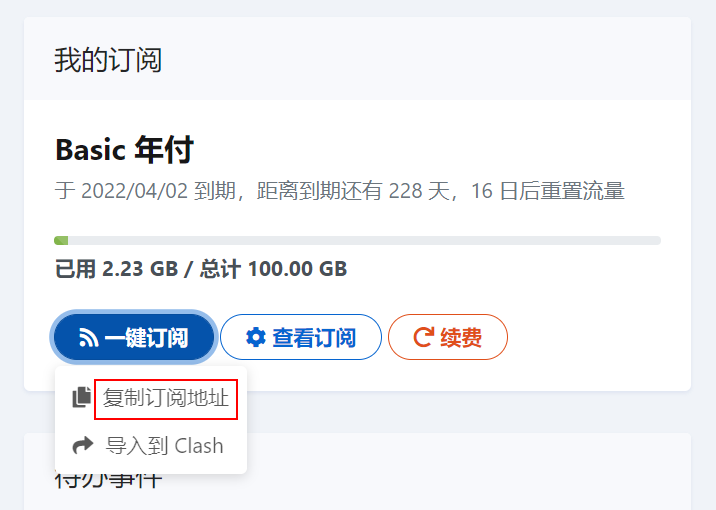
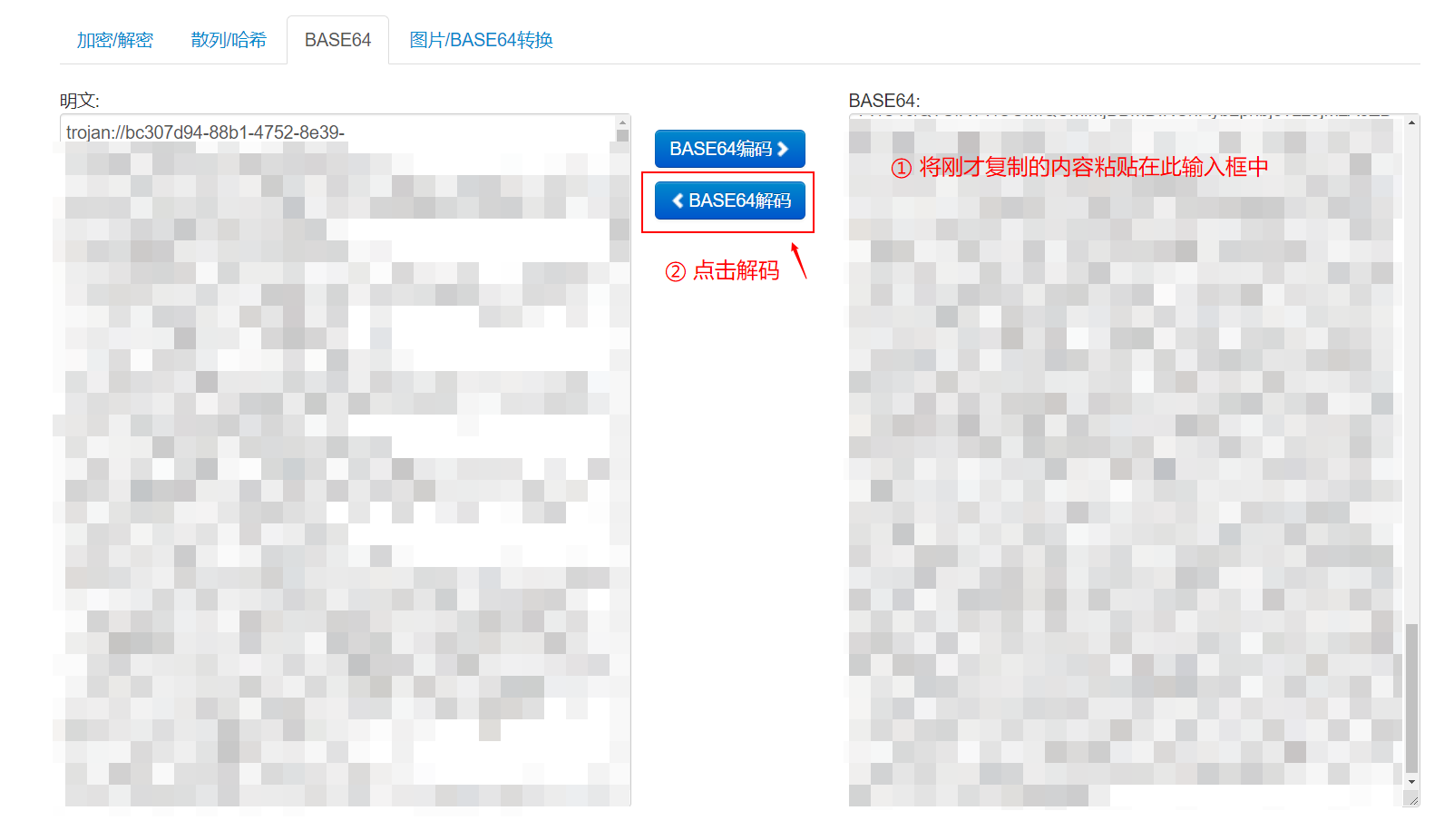
然后访问 https://tool.oschina.net/encrypt?type=3
- 将复制的内容粘贴在右侧输入框中
- 点击 BASE64解码
- 左侧即为您的配置,每行一个
以下方配置为例
trojan://061e7136-077d-4d1e-9327-5ab231464401@cm.nwncd.com:54009?allowInsecure=1&peer=azhk09.nwncd.com&sni=azhk09.nwncd.com#%E4%B8%AD%E5%9B%BD%E9%A6%99%E6%B8%AF%20A09
061e7136-077d-4d1e-9327-5ab231464401为UUIDcm.nwncd.com为连接地址54009为连接端口azhk09.nwncd.com为sni
编辑配置
下方是 config.json 文件中的部分片段,请依照提示修改,然后保存
{
    "run_type": "client",
    "local_addr": "127.0.0.1",
    "local_port": 1080,
    "remote_addr": "请将我修改为连接地址",
    "remote_port": 请将我修改为连接端口,
    "password": [
        "请将我修改为 UUID"
    ],
    "log_level": 1,
    "ssl": {
        "verify": 请将我由 true 修改为 false,
        "verify_hostname": 请将我由 true 修改为 false,
        "sni": "默认没有这一行,请先复制粘贴添加,然后将我修改为 sni",
创建服务
echo '[Unit]
Description=trojan
After=network.target

[Service]
Type=simple
PIDFile=/usr/src/trojan/trojan.pid
ExecStart=/root/trojan/trojan -c /root/trojan/config.json -l /root/trojan/trojan.log
ExecReload=/bin/kill -HUP \$MAINPID
Restart=on-failure
RestartSec=1s

[Install]
WantedBy=multi-user.target' > /etc/systemd/system/trojan.service
启动服务
systemctl start trojan
验证代理
返回结果应为我们的服务器ip
root@debian:~# curl ip.sb --socks5 127.0.0.1:1080
40.83.91.xxx
管理服务
启动、停止、重启服务的命令分别是
systemctl start trojan
systemctl stop trojan
systemctl restart trojan
设置 git 代理
git config --global http.proxy 'socks5://127.0.0.1:1080'
git config --global https.proxy 'socks5://127.0.0.1:1080'
取消设置 git 代理
git config --global --unset http.proxy
git config --global --unset https.proxy
参考来源
https://github.com/trojan-gfw/trojan/releases
https://xbsj6147.xyz/pagesv2/download-linux.html
https://gist.github.com/laispace/666dd7b27e9116faece6